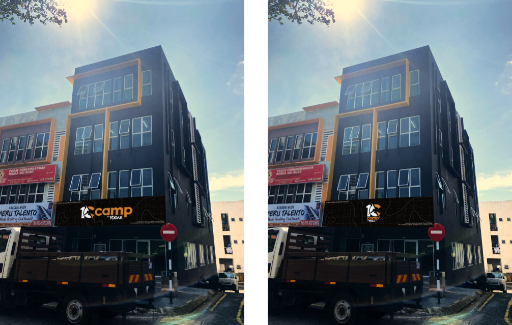
10 CAMP is the outdoor arm of the TODAK family — bringing premium camping, hiking and lifestyle gear from 11 hand-picked brands under one roof. From multi-night expeditions to weekend backyard escapes, we believe the right gear makes every adventure feel like home.
Visit us at our flagship store in Cyberjaya, or browse our full catalogue online with same-day Klang Valley delivery.
Tengok semua stok ikut brand, kategori, atau status. Klik kad untuk edit.
0Total Produk
0Brand
0Kategori
0Low Stock
0Sold Out
SKU Profile
Informasi Fizikal & Logistik
Bilangan / Total Stock
Lokasi Gudang (Bin)
Cost / Retail
Semakan Audit Inventori Per-Item
— / —
Kira dan sahkan kuantiti secara teliti. Tekan "Submit" bagi setiap item yang dikira, atau gunakan pengimbas kod.
Tumpu Scanner Anda Di Sini
(Pop-up kemaskini kuantiti fizikal akan muncul secara automatik)
Sesi Aktif
—
— / —
Loading…
Cipta Purchase Order (PO) Baru
Sistem tempahan rasmi untuk bekalan stok. Masukkan butiran pembekal dan senarai barang yang ingin dipesan.
Senarai Barang Ditempah
SKU
Kuantiti
Kos/Unit (RM)
Jumlah Kos (RM)
Tindakan
Belum ada barang dimasukkan.
Total Keseluruhan PO:
RM 0.00
Senarai PO Aktif & Sejarah
Tekan "Terima Stok (Receive)" apabila bekalan tiba di gudang. Sistem akan auto-inbound stok ke dalam lejar.
No. PO
Pembekal
ETA Tiba
Status
Senarai SKU
Tindakan (Goods Received)
Loading PO records...
Smart Picking List (Laluan Kutipan Pintar)
Masukkan senarai SKU barang yang anda ingin ambil dari stor. Sistem akan menyusun senarai ini mengikut laluan berjalan kaki terpendek (Zone Aisle Rack Tier Bin).
Senarai item kutipan kosong.
Barcode & Label Generator
Cetak sticker label produk untuk ditampal pada kotak atau rak. Boleh dibaca oleh barcode scanner sewaktu proses Cashier atau Inbound.
Prebiu label akan dipaparkan di sini.
FIFO Listing
Batch stok disusun First-In-First-Out — yang masuk dulu, ambil/jual dulu. Batch lama di atas; ambil dari sini dulu untuk elak stok lama tersimpan.
Tarikh Masuk
SKU
Produk
Baki
Diterima
Kos/Unit
Umur
PO / Supplier
Loading...
Cost Calculator (Shipment)
Landed cost sebenar tiap unit = Barang (RMB×ex) + SF % (ikut nilai) + Shipping (ikut kuantiti) + Part-timer (ikut kuantiti). Simpan & buka semula ikut shipment.
1. Product Calculator Method
Masuk produk shipment + kos RMB/unit + kuantiti. Goods & SF dikira auto.
SKU
Nama
Kos RMB/unit
Qty
Goods RM/u
SF RM/u
Jumlah Qty: 0
2. Shipping Calculator Method
Shipping/unit: RM0.00
3. Inventory Calculator Method (Part-timer)
Part-timer/unit: RM0.00
4. Inventory Cost Recorded
Landed cost akhir tiap unit. Pilih nak apply ke kos rasmi produk atau rekod jadi kos batch stok.
SKU
Goods
SF
Shipping
Part-timer
LANDED/unit
Qty
Rekod Order / Shipment Lalu
Semua shipment disimpan. Klik "Buka" untuk lihat/edit. Rekod sahaja — tak ubah stok/kos melainkan ko tekan Apply dalam tab Kira.
Capture social media KPI manual (POS tak ada integrasi langsung). Irfan isi setiap minggu, save ke Posted Reports inbox.
Isi Data Minggu Ni
Anggar je kalau tak ingat tepat. Compare vs minggu lepas dalam history table di bawah.
TikTok
Instagram
Facebook
Notes Tambahan
KPI Last 4 Weeks
Total Posts
—
Total Views (k)
—
Total Engagement
—
Total Leads
—
History Weekly Data
Memuatkan…
Sales Ledger — Sejarah Jualan Penuh
Semua jualan dalam DB, susun dari yang paling terkini. Klik mana-mana baris untuk lihat line items.
Tarikh
Order
Customer
Items
Total (RM)
Channel
Staff
Status
Product Sales Summary
Jualan semua produk sepanjang sejarah. Balance = Stock Sekarang − Total Sold. Kalau jualan melebihi stok terkini, baki akan jadi negative — bermakna SKU tu high-velocity dan kemungkinan ada activity dalam EasyStore.
SKU
Nama / Brand
Total Sold (Lifetime)
Last 6mo
Stock Sekarang
Balance
Reorder Point
Revenue (RM)
Last Sale
Stock Aging Report
Berapa lama setiap batch dah duduk dalam gudang? Stok> 365 hari biasanya dead stock — perlu clearance / discount.
Bucket
Qty
Modal Diikat (RM)
Potensi Jualan (RM)
% Modal
Drilldown
Stock Snapshot (Period-End)
Eksport laporan stok pada satu tarikh tertentu — guna untuk closing akaun bulanan / suku tahun. Sistem akan rewind transaction history untuk anggar baki sebenar pada tarikh tersebut.
Nota: Snapshot adalah anggaran (rewind dari current state). Untuk akuracy 100%, recommend monthly cron job snapshot in real-time. Sekarang ni cukup untuk audit/accountant reference.
Stock Valuation & Asset Dashboard
Pemantauan jumlah keseluruhan modal dan nilai aset yang berada di dalam gudang secara masa sebenar (*real-time*).
Total Modal Aset
RM 0.00
Kos stok sedia ada
Total Nilai Runcit
RM 0.00
Potensi jualan kasar
Unjuran Keuntungan
RM 0.00
Potensi untung kasar (ROI)
Top 10 High Value Assets (Pengikat Modal)
#
SKU
Nama Produk
Baki Stok
Kos/Unit
Total Modal (RM)
Mengira nilai aset...
Analytics
7 hari30 hari90 hariBulan iniYTDCustom
→
Jualan
RM 0
—
Order
0
—
Purata / Order
RM 0
—
Unit Terjual
0
—
Customer Baru
0
—
Kadar Ulang
0%
—
Trend Jualan — semasa vs tempoh sebelum
Top 10 Produk (hasil)
#
Produk
Unit
Hasil
Top Brand (hasil)
#
Brand
Unit
Hasil
Top Kategori (hasil)
#
Kategori
Unit
Hasil
Prestasi Channel
Channel
Order
Hasil
%
Customer Baru vs Ulang
Top 10 Customer (hasil)
#
Customer
Order
Hasil
Jam Paling Sibuk
Hari Paling Sibuk
Laporan Sulit (PNC)
Maklumat SULIT operasi POS — jualan & wang berisiko. Hanya untuk pihak diberi kuasa.
Financial rasmi 10 CAMP diurus di 10cc (bukan POS). Data finance POS dah dipindah ke 10cc, jadi POS tak papar margin/untung di sini supaya tak menyesatkan. Sambungan POS ↔ 10cc (financial alignment) dalam pembinaan.
Issue store credit untuk refund/compensation. Track balance per customer, apply ke checkout future. Expiry option.
Stock Transfer
Coming Soon
Transfer stok antara lokasi (Inventory Room ↔ Floor 1 ↔ Cyberjaya outlet). Audit trail tiap movement.
Belum Bayar / Abandoned
Order yang dah dibuat tapi customer belum bayar (status Belum Bayar). Follow up untuk recover jualan. 10 CAMP takde web cart — sumber = order belum bayar dari semua channel.
Tarikh
Order
Pelanggan
Channel
Items
RM
Umur
Tindakan
Loading...
All Orders
0 order dipilih
Tarikh
Order
Pelanggan
Channel
Kaedah
Status
Items
RM
Resit
Aksi
Loading...
Customer Database (CRM)
Nama
Phone
Email
Total Spent (RM)
Orders
Points
Member
Consent
Tags
0dipilih
Email Blast Composer
Cara guna: Klik Generate → fail.txt akan download dengan SUBJECT + BODY + senarai BCC. Buka email kau (Gmail/Outlook), salin kandungan & paste. SMTP terus akan datang kemudian.
Promotion & Voucher Manager
Promo aktif auto-apply masa checkout (rules-based: cart total / brand / category / SKU / customer tier). Klik Festival Templates untuk one-click setup Raya/CNY/Deepavali/Merdeka/dll.
Code / Description
Type / Conditions
Value
Status
Loading…
Laporan Saya
Ringkasan prestasi · — · — · —
Lihat Laporan Staf
Klik kad staff untuk buka laporan terperinci.
Drill-down view akan datang Phase 1B (selepas Admin template stable).
Aduan & Cadangan
Hantar aduan bug, cadangan tambah baik, atau request training. Bos akan baca + reply.
Hantar Aduan Baharu
Aduan Saya
Status terkini dan reply dari Bos.
Memuatkan…
Inbox Aduan
Aduan & cadangan semua staff. Triage, reply, mark resolved.
Memuatkan…
Payment Proofs Monitor
Resit pembayaran yang client / staff dah upload. Filter ikut tarikh, kaedah, channel.
Manage staff access, roles, and what each team member can view or do.
Shop Settings
Store-wide settings — address, operating hours, contact, company info.
Payments
DuitNow QR, FPX, cards, cash — gateways and payment settings.
Sync (Advanced)
EasyStore, TikTok Shop, Shopee — sync stock and external orders.
System Test Guide
POS system test guide for the owner to verify each module flow.
Memo Board
Pengumuman dan polisi · memo approved kekal sebagai rujukan staf.
Department:
Loading memos…
Hantar Memo Baru
Memo akan masuk Pending Approval dulu. Hanya selepas Bos lulus, ia muncul untuk semua staf rujuk.
Tolak Memo
Revenue
RM 0
—
Expenses
RM 0
—
Net Profit
RM 0
—
Outstanding (AR)
RM 0
0 invois
Profit Margin
0%
—
Revenue Breakdown
Expense Breakdown
P&L Trend (Monthly)
Expense Ledger
Period
Category
Notes
Amount
Action
Loading...
Record Expense / Income
Personal Sales & Commission Tracker
Per-staff view
This MonthLast MonthThis WeekYTDAll Time
Gross Sales
RM 0.00
0 transactions
Refunds
RM 0.00
0 refunds
Net Sales
RM 0.00
After refund clawback
Commission Earned
RM 0.00
at —%
Komisen dikira 5% pada setiap unit SKU terjual (harga × qty − diskaun). "Gross/Net" di sini = nilai produk, bukan total resit (tak masuk shipping/tax).
All Staff Summary (Manager View)
Staff
Role
Tx
Gross
Refunds
Net
Rate
Earned
Transaction Detail
Tarikh
Receipt
Customer
Nilai Produk (RM)
Commission
Pilih range untuk lihat rekod.
Create Invoice / Quotation
Bina sebut harga rasmi atau Invois B2B secara manual.
Editing Mode:
Select Items to Quote
Cari produk dari inventori dan masukkan ke senarai quotation.
Computes per-SKU sales velocity from history → suggests reorder_point + reorder_qty. Recommend run sebulan sekali.
Daftar / Edit Master Product
Daftar produk baru, atau load SKU sedia ada untuk edit. Field bertanda * wajib.
EDIT MODE
A. Maklumat Asas
B. Kos, Harga & Stok
Tip: Margin = (Harga − Kos) ÷ Harga. Compare-at = harga asal yang dicoret (kalau lebih tinggi dari Harga Jualan, produk papar badge diskaun + harga coret). Initial Quantity akan auto-cipta inventory batch awal kalau diisi.
Harga custom per channel. Biar kosong = guna markup global auto. Isi = harga tetap untuk channel tu (di-push masa Save).
C. Variant (Pilihan)
Kosongkan kalau cuma guna Warna + Saiz di atas. Tiap line = satu option group untuk variant combo.
C2. Variant Setting
D. Logistik & Saiz Fizikal
E. Maklumat Tambahan
G. SEO (untuk website / EasyStore / Shopify)
F. Polisi Tempahan Semula (Reorder)
Sistem akan bunyikan amaran apabila stok jatuh ke bawah reorder_point. Lead time bantu kira "kena order bila".
Lepas daftar, scroll ke bawah ke "Masukkan Stok" untuk record kuantiti fizikal pertama.
Masukkan Stok (Purchase Order / Batch)
Rekodkan tarikh PO dan kuantiti stok yang tiba (SKU MESTI wujud dalam Master Product).
Bulk System Importer (CSV)
Pergerakan Inventori (Inbound & Outbound)
Merekod secara rasmi setiap unit fizikal yang masuk (dari pembekal) atau keluar (kegunaan stor/rosak).
Terima Stok Baru (Inbound Manual)
Untuk PO rasmi, guna "Terima Stok" di Purchase Orders. Form ni untuk transfer dari cawangan / stok lama / penerimaan tanpa PO.
Keluarkan Stok (Outbound)
Lejar Pergerakan Stok (Movement History)
Log terperinci bagi setiap pergerakan inventori (Inbound, Outbound, Stock Take).
Tarikh & Masa
Staf Bertugas
Jenis Transaksi
SKU / Item
Kuantiti (+/-)
Rujukan / Catatan
Tiada log direkodkan atau sedang dimuatkan...
Audit Stok Berkala (Cycle Count)
Imbas SKU atau taip untuk membandingkan kuantiti sistem vs kuantiti fizikal.
Discrepancy & Write-Off Log
Laporan stok hilang/rosak menunggu kelulusan anda.
SKU / Kes
Dilapor Oleh
Tindakan
Master Supplier Database
Pembekal aktif dari DB. Klik nama untuk edit.
Nama
Negara
Lead
Status
Loading...
Master System Management
Superior Access Only
Akses sulit pengarah untuk token pangkalan data (Supabase), sandaran keseluruhan, dan pelepasan (override) keselamatan hub lain.
Pengurusan Cuti & Jadual Roster (HR)
Penyelarasan syif operasi (11pg-8mlm / 2ptg-8mlm), Cuti Berbayar, dan MC berserta Sijil Sokongan.
Peti Menunggu Kelulusan Roster (Pending)
Staf Pemohon
Tarikh Diminta
Syif Baru
Lampiran
Tindakan Kelulusan
Tiada permohonan terkini.
Sila tunggu penjanaan grid bulanan...
A Shift A: 11am-9pm
B Shift B: 2pm-8pm
C Shift C: 11am-8pm
OFF Off Day
AL Annual Leave
MC Sick Leave
EL Emergency Leave
PH Public Holiday
Staf
Leave Balance (AL)
Loading balances...
CMP ID
Tanda Nama (POS)
Nama Individu Sepenuhnya
Tarikh Mula Kem
Tempoh Perkhidmatan (Semasa)
Loading Staff Directory...
Pemantauan Kehadiran Harian (Clock-In)
Sistem akan mewajibkan staf scan wajah jika berada dalam radius (?m).
Staf
Tarikh
Masa Masuk
Gambar Masuk
Masa Keluar
Gambar Keluar
Rekod kehadiran hari ini sedang dimuatkan...
Audit Log HR (Keputusan Jadual)
Senarai sejarah kelulusan (Approve) atau penolakan (Reject) permohonan staf.
Masa & Tarikh Tindakan
Admin Bertugas
Tindakan / Subjek
Cuti / Penerangan
Tiada log direkodkan atau sedang dimuatkan...
Tetapan Roster (Override)
Tetapkan waku rehat rasmi mingguan.
Graf Prestasi Jualan
-
Executive Staff Sales Report
Rank
Nama Staf
Total Transaksi
Gross Sales (RM)
Loading performance...
Customer Log Issues
Pemantauan pertikaian, masalah atau tiket pelanggan.
Pelanggan
Isu / Aduan
Status
Petty Cash (Buku Tunai)
Tarikh
Jenis
Nota
Amaun
Baki
Tiada rekod.
Audit Alerts
Auto-detect suspicious patterns: refund spikes, after-hours voids, large discount tanpa approval, sales by deactivated staff. Rule-based, ran on-demand. Mark as reviewed bila dah investigate.
Active detection rules (7):Refund spike · Void luar jam · Large discount no approval · Inactive staff sale · Multi-refund same staff · High-value cash · Post-EOD sale
Manual backup semua data — tables Supabase + localStorage (sales history, custom staff, shift log) jadi 1 file JSON. Recommend simpan ke external drive / Google Drive at least weekly.
Manual Backup
Last backup: belum ada
Sync Conflict Log
Bila multi-user edit data sama dalam masa yang sama, conflict detected → log di sini.
Loading conflict log...
System Test & Guide
QA checklist setiap feature shipped. Ikut steps satu per satu, mark pass/fail. Status disimpan locally (testGuideStatus_v1).
0 / 0 tested
Test cases curated from milestone deliverables. Tambah test case baru dengan edit TG_TESTS array dalam app.js.
Re-engage Campaign
Win back dormant customers via personalised WhatsApp outreach. Tier by days-since-last-order. Anti-spam: same customer skipped if messaged within last 30 days.
Sleeping30–59 days
—
customers ·RM 0historic value
Cold60–89 days
—
customers ·RM 0historic value
Lost90+ days
—
customers ·RM 0historic value
Sleeping customers (30–59 days)
Showing0eligible (after anti-spam filter). Tick to include in send.
Hantar promo / reminder ke ramai customers sekaligus via wa.me click-to-send. Tak perlu WhatsApp Business API. Browser akan open tab baru per customer (max 10 sekali untuk avoid rate-limit).
Click button untuk start. Browser akan open 10 tab sekali (batched). Sila approve popup permission. Selepas tu klik tab "Continue" untuk batch seterusnya.
Stock Reservations
Setiap quotation/invoice yang created akan auto-lock stock untuk 7 hari. Bila quote void/superseded, stock auto-released. Kalau quote convert ke real sale, akan deduct from physical stock.
SKU
Product
Qty
Source
Reference
Expires
Action
Loading...
Phase 1 · p1_4
Sync & Data Integrity
Bila 2 cashier edit record yang sama dari device berbeza, mana yang menang? Default Supabase = last-write-wins (User A's changes hilang silently). Module ni implement optimistic locking dengan version field — industry-standard pattern untuk multi-user systems.
SyncGuard Loaded
EasyStore → POS Sync HealthLoading…
Two-layer protection: real-time webhook + 15-minute backup cron. Kalau webhook diam, cron tetap tarik order dalam 15 minit max.
Sambung POS terus dengan TikTok Shop & Shopee tanpa perlu lalui EasyStore. Klik butang untuk authorize kedai.
TikTok ShopLoading…
Direct API integration via TikTok Partner Center. Currently parked dryrun mode — orders sync via EasyStore. Activate cutover untuk direct API.
Shopee Open PlatformLoading…
Authorize kedai Shopee anda — sandbox mode untuk test, production untuk live. Buka tab baru, login Shopee, klik Confirm Authorization.
Cron auto-sync setiap 15 min · checking…
Webhook (real-time push)
Daftar URL ni dalam Shopee Open Platform console → app → Push Notification:
https://www.10camp.com/api/shopee-webhook
Subscribe event: Order Status Update (code 3). Bila ada order baru / status berubah, Shopee push notif terus ke POS dalam saat (tak perlu tunggu cron 15 min).
The Problem
Tanpa sync guard:
10:00 — Aiman
Loads customer "Faris" record on his iPad
10:01 — Hakim
Loads same record on his phone
10:05 — silent loss
Aiman saves email update. Hakim saves phone update. Aiman's email change hilang.
Step 1 — Run Migration on Supabase
Pilih tables yang multi-user (skip append-only tables macam audit_log). Click Copy untuk SQL.
Test conflict detection & resolution UX tanpa sentuh real DB. Aiman (User A) dan Hakim (User B) dua-dua loaded record yang sama. Edit field, click Save — yang second akan trigger conflict modal.
Click "Verify" untuk check setiap table — adakah version column dah wujud. Test guna existing Supabase client (read-only, safe).
Step 2.5 — Auto-Wire Existing Updates
Toggle ON untuk monkey-patch existing db.from(t).update(...) calls — version cache + conflict detection happens auto, zero changes ke app.js.
Auto-Wire Mode
Intercept all .update() calls on versioned tables
Step 3 — Manual Wire (alternative to auto)
Module window.SyncGuard dah loaded. Replace existing supabase.from(t).update(...) calls dengan SyncGuard.update(...) untuk get conflict detection automatically.
// Old way (last-write-wins, conflicts silent):const { error } = await supabase.from('customers')
.update({ phone: newPhone }).eq('id', customerId);
// New way (optimistic lock, conflicts caught):const result = await SyncGuard.update(supabase, 'customers', customerId, loadedVersion, {
phone: newPhone
});
if (result.conflict) {
// Show conflict resolution UI to user
showConflictModal(result.current, result.attempted);
} else if (result.ok) {
// version auto-bumped, save successful
loadedVersion = result.current.version;
}
Conflict Log
Setiap conflict yang detected (sama ada dari simulator atau real app calls) recorded di sini. Useful untuk identify hot-spot tables.
Manual Backup — Download All Data
Klik untuk export semua tables (customers, products, inventory, finance, dll) plus localStorage (sales history, custom staff, shift log) jadi 1 file JSON. Download terus ke laptop kau. Recommend simpan kat Google Drive / external hard drive at least weekly.
Last backup: never
Sync Conflict Detected
Someone else updated this record while you were editing. Pilih cara resolve:
Open Shift
Selamat pagi! Kira tunai dalam laci sekarang dan masukkan opening float. Ni baseline untuk reconciliation lepas habis shift.
Close Shift & Reconcile
Kira fizikal tunai dalam laci, masukkan amount actual. System akan compute variance.
VarianceRM 0.00
Variance ≠ 0 — Manager approval required
Permissions Centre
Bos kawal apa setiap staff boleh akses. Tick / untick checkbox terus, semua change auto-save + audit-log.
Hanya Bos boleh ubah permissions. Mode read-only sahaja.
Staff
Kaunter
Operasi
Pengurus
Loading…
Auto-save: setiap toggle terus simpan ke staffModeAccess_v1 + audit_logs.
Default: setiap staf nampak semua item dalam mode yang dia ada akses. Untick item untuk explicitly hide dari staf tu (extra restrict tanpa kena buang akses mode).
Pilih staf untuk start.
Klik "Apply" untuk grant mode + sidebar access dalam satu shot. Custom template boleh save dari tab Item Sidebar.
Loading templates…
Riwayat 50 perubahan permission terkini.
Loading…
Phase 1 · p1_3 + p1_5
Staff Management
Add staff baru, assign role, dan preview menu apa setiap role akan nampak. Staff yang ditambah di sini disimpan ke localStorage dan auto-merge dengan staff hardcoded — boleh login dengan PIN sama macam staff lama.
Staff Directory
Staff ID
Name
Role
Department
Email
Joined
Status
Actions
Permission Preview
Pilih role untuk preview sidebar menu yang dia akan nampak. Useful untuk verify access scope sebelum assign role baru.
Add New Staff
Staff yang ditambah akan available untuk login dengan PIN yang kau tetapkan. Staff ID kena unique.
Unique, format CMP###
Short username, no spaces preferred
For login. 4-6 digits.
% dari gross sales. 0 = no commission. Default 5% kalau dibiar kosong.
Hanya Bos boleh ubah. Default landing = mode tertinggi yang accessible (HQ > Pengurus > Operasi > Kaunter).
Phase 2 · Active
Compliance & Payments MY
Tier-1 critical untuk pasaran Malaysia: e-Invoice MyInvois, DuitNow QR, e-wallet, SST, PDPA. Setiap modul yang kau setup di sini buat sistem 10 CAMP legal-ready untuk B2B.
—%
0 of 7 done
Shop Info — Receipt Header
Maklumat ni akan keluar kat header receipt setiap transaction. Default = "10 CAMP". Kemaskini phone, address, SSM number untuk receipt yang lebih professional.
Saved
Hardware Profiles
Configure printer + cash drawer + scanner. Settings akan apply masa cetak receipt.
Saved
Low Stock Push Notifications
Browser akan bagitau bila stok produk jatuh di bawah reorder point. Check setiap 4 jam.
⭐ Loyalty Tier Discounts (Bronze / Silver / Gold)
Customer auto-tier based on lifetime order count: Bronze (3-9), Silver (10-29), Gold (30+). Set per-tier diskaun %.
Saved
Bronze: - ·
Silver: - ·
Gold: -
SST & Tax Configuration
Set tax rate untuk auto-apply pada cart. Bila kau dah register dengan Royal Malaysian Customs Department (RMCD), masukkan registration number untuk muncul dalam tax invoice.
Registered with RMCD?Toggle on kalau business kau dah daftar SST
RMCD registration number — appears on tax invoice
Standard MY rate: 6% (service) or 5-10% (sales)
Tax-inclusive pricingHarga sudah termasuk SST (default Malaysia retail)
Next step: Setting akan disimpan ke localStorage. Untuk apply ke cart calculation, perlu wire ke app.js — ada placeholder hook window.__getSstSettings() yang return current config.
Saved
DuitNow QR Generator
Generate static EMVCo-compliant DuitNow QR berdasarkan PayNet spec. Customer scan dengan banking app untuk bayar terus ke akaun kau. Untuk production, certify dengan bank kau dulu.
Penting: QR yang generated di sini ikut spec EMVCo + PayNet untuk testing & demo. Untuk live transactions, gunakan QR yang dah register & certify dari bank kau (Maybank2u QR, CIMB QR, dll).
Account number, phone (60xxxxxxxxx), or BR number
Static QR (no amount) untuk display kekal di kaunter
Preview
Generate QR untuk preview di sini.
EMVCo Payload (TLV)
E-Wallet Acceptance
Toggle e-wallet mana kau accept & masukkan merchant ID. UI working — actual payment integration kena setup dengan provider masing-masing dalam Phase 3.
Saved
DISCLAIMER — Draft / Preview Mode
XML yang di-preview dalam tab ni adalah format draft berdasarkan UBL 2.1 — BUKAN versi yang LHDN MyInvois akan accept.
Production submission perlu: digital signature (signed XML), JWT OAuth2 auth, embedded QR code, buyer TIN validation, sequential invoice numbering per supplier — semua tu kena server-side service yang separate.
Use case sekarang: Reference XML untuk validate format kau, atau hantar manually via portal LHDN setelah edit/sign secara berasingan. Jangan rely kat scaffold ni untuk auto-submit.
e-Invoice MyInvois (LHDN)
Mandatory rollout LHDN untuk semua MY business by 2027 (phased). Setup credentials di sini — actual API integration kena pakai sandbox mula-mula sebelum production.
Not Connected
Tax Identification Number dari LHDN
Stored in localStorage (kena migrate ke server-side untuk production)
Implementation Roadmap
DoneConfig UI & credential storage
DoneSubmission queue (manual mark) + UBL XML preview
NextOAuth2 token exchange + refresh (server-side)
ThenAuto-submit invoice (single/batch) endpoint
ThenBuyer TIN validation + QR code on receipt
ThenCancellation/rejection flow (72-hour window)
Submission Queue (last 30 days)
Senarai sales yang **belum di-submit** ke MyInvois. Sebelum auto-submit live, kau boleh: (1) preview UBL XML yang akan dihantar, (2) tandakan manually sebagai "Submitted" lepas hantar via portal LHDN. Status simpan dalam localStorage myinvoisSubmitted_v1.
—
UBL 2.1 e-Invoice XML Preview
Format draft mengikut LHDN MyInvois schema. Production submission perlu signed XML + JWT auth dari server-side service.
PDPA Compliance Tools
Personal Data Protection Act 2010 (MY equivalent of GDPR) bagi customer hak untuk: access, correct, delete, & restrict processing data peribadi. Tools di sini handle 2 yang paling kerap diminta: Export & Delete.
Right to Access
Export semua data customer (sales, customers, audit log) sebagai JSON. Bagi pada customer yang mintak data mereka.
Right to Erasure
Padam customer record specific. Audit log akan record action ini sebagai compliance evidence.
Data scope: customer table dari Supabase (kalau wired) + localStorage backup. Audit log entry akan dicipta untuk setiap export/delete sebagai compliance trail.
↩ Returns & Refunds
Cari transaksi asal, pilih barang nak dipulangkan, dan luluskan dengan PIN manager. System auto-restock inventory (pilihan), reverse commission, dan rekod refund dalam history.
RECEIPT
—
— Date
— Customer
— Payment
PILIH BARANG NAK PULANG
Refund Amount: RM 0.00
Manager Approval Required
Recent Refunds (last 30)
Pengesahan Kehadiran
Mengesan koordinat GPS anda...
Menghidupkan Kamera...
SKU | Nama Produk
Product status
Media
Format: JPG, PNG, WebP (disyorkan — saiz kecil), AVIF, GIF · max 8MB setiap gambar. Boleh pilih banyak sekali gus.
RM (tetap) = harga sebenar channel tu. % markup = atas harga POS. Kosong = guna markup global auto. Di-push masa Simpan.
Harga Shopee sensitif — ubah berhati-hati (risiko flag misleading + kunci 7 hari).
Satu Product ID / Item ID per produk — auto dikongsi SEMUA variant bila Save (ID peringkat variant diurus auto oleh sync). Badge integration jadi hijau dlm Product Master grid.
Link direct customer-landing. Kosong = fallback (Shopee cari ikut SKU / TikTok shop). Auto-isi Shopee bila Item ID ada.
SEO (untuk website / Shopify / EasyStore)
Danger Zone
Padam produk dari Master. Kalau ada batch / sales / session reference, system tolak — guna Draft status sebagai gantian.